
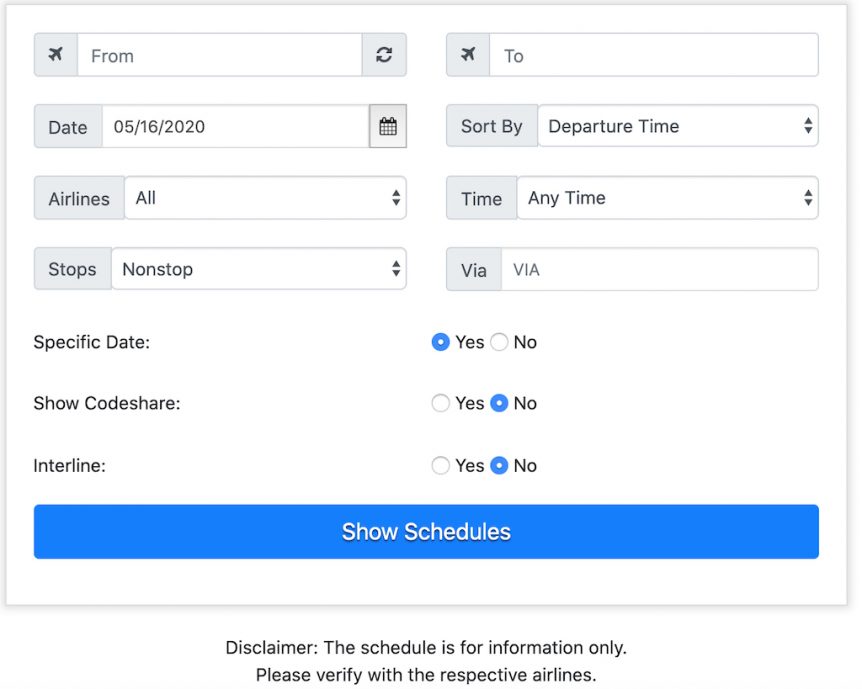
This page explains how to use flight schedules on Passrider. The tool searches published timetables for more than 400 airlines worldwide. It is built for airline employees planning non-rev travel, so its defaults are set up the way a passrider needs them — nonstop flights only, no codeshares, no interline — rather than the way a revenue passenger would want them.
This page explains every field on the search form and, more usefully, why the defaults are what they are. If you only read one section, read Show Codeshare — getting that one wrong is how people end up at a gate holding a pass that isn’t valid for the flight in front of them.
Go straight to the flight schedules tool →
Quick reference
Every field on the form, what it does, and what I’d leave it set to.
- From / To — airport code, airport name, or city name. Metro codes work.
- Date — MM/DD/YYYY. Today or later only.
- Sort by — Departure Time, Arrival Time, Duration, or Connection City. Default: Departure Time.
- Airlines — a specific carrier, or All. Default: All.
- Time — Any Time, Am, Pm, or Night. Default: Any Time.
- Stops — Nonstop, All Flights, Direct, or One Stop/Nonstop. Default: Nonstop.
- Via — restrict connections to one airport, by three-letter code.
- Specific Date — Yes for one day, No for the whole week. Default: Yes.
- Show Codeshare — leave this on No. Default: No.
- Interline — leave on No unless you know you need it. Default: No.
If you are a Passrider Premium member, you can save your own defaults in your Profile so the form comes up pre-filled every time.
From and To
Enter an airport code, an airport name, or a city name. A dropdown will usually appear as you type — but if it doesn’t, don’t worry about it. Type a valid three-letter airport code and hit search, and you will still get results. The dropdown is a convenience, not a requirement.
Use the  icon between the two boxes to flip your origin and destination. Useful when you are checking the return before you commit to the outbound.
Metro codes: search a whole city at once
Many cities have a metro code that covers every airport in the area. This is the single most useful trick on this page for non-rev travel, because your backup airport is often the one with the open seat.
- NYC — all New York area airports (JFK, LGA, EWR)
- LON — all London airports (LHR, LGW, STN, LTN, LCY)
- PAR — Paris (CDG, ORY)
- CHI — Chicago (ORD, MDW)
- BER — Berlin
- TYO — Tokyo (NRT, HND)
- HOU — Houston (IAH, HOU)
Two that catch people out: DAL is Dallas Love Field only, and DFW is Dallas/Fort Worth only. Neither one searches both.
Date
Use the calendar, or type the date directly in MM/DD/YYYY format — so 3 March 2027 is 03/03/2027 and 12 November 2026 is 11/12/2026. Only today’s date or later will be accepted; published schedules generally run about eleven months ahead.
Sort by
Results come back sorted by Departure Time unless you change it. Your other options are Arrival Time, Duration, and Connection City.
Connection City is the one worth knowing about. Sorting by it groups every itinerary through the same hub together, so you can see at a glance which connecting points actually have depth on your route — which matters a great deal more when you are flying standby than when you have a confirmed seat.
Airlines
Leave this on All unless you have a reason not to. If you pick a specific carrier and get nothing back, switch to All before concluding the route doesn’t exist — a carrier filter that is slightly off will return an empty result rather than an error.
If an airline you have an agreement with isn’t in the list, send me a note and I’ll look into adding it.
Time
Narrows results to a departure window: Am, Pm, or Night. Leave it on Any Time for a first look. On a standby trip you usually want to see everything, then decide — the 6am departure you would never book is often the one with seats.
Stops
Four options, and the wording matters because two of them sound alike:
- Nonstop (the default) — one takeoff, one landing, no stops.
- Direct — one flight number, but the aircraft stops somewhere along the way. You stay on the same flight; the plane does not go straight there.
- One Stop/Nonstop — nonstops plus single-connection itineraries.
- All Flights — everything, including longer connecting routings.
The nonstop-versus-direct distinction trips up experienced travellers regularly. I’ve written it up in more detail: what’s the difference between a direct flight and a nonstop flight.
Via
Enter a three-letter airport code to see only itineraries connecting through that airport. The useful application is avoidance rather than selection: if you know a particular hub is weather-prone in February, or is thick with other non-revs on a Friday, run the search through the alternative and compare what you get.
Specific Date
Set to Yes and you get the schedule for that day only. Set it to No and you get seven days, with your chosen date highlighted.
Use No when you are planning rather than travelling. Not every route operates daily, the aircraft type can change between days of the week, and departure times drift. Seeing the full week tells you what your options are if you don’t make your first flight — which, on a standby ticket, is the question that actually matters.
Show Codeshare
Leave this on No. This is the setting most likely to cost you a trip.
A codeshare flight is operated by one airline and sold under the flight numbers of several others. Delta and KLM, for example, codeshare on Amsterdam–Detroit — but the aircraft is operated by Delta. Your pass agreement is almost always with the airline operating the flight, not the one marketing it. So if you have an agreement with KLM and not with Delta, that flight is not available to you, no matter how convincingly it appears under a KL flight number.
Setting Show Codeshare to No strips the marketing duplicates out and leaves you looking at who is actually flying the aircraft.
Interline
Leave this on No too, unless you specifically know you need it.
An interline itinerary combines flights from two or more airlines that have an agreement to work together across a single journey. They are legitimate itineraries, but they multiply the number of pass agreements you need to have in place, and they are not what you want cluttering a first search.
If the page is giving you trouble
There is a lighter mobile version at passrider.com/mobile. If the full search page is slow on your connection, try that one.
Schedules on this site are published timetables, provided for planning. They are not a booking system and they are not a seat count. Always verify with the operating airline before you travel, and check flight loads for the number that actually decides whether you get on.
Related reading
- Flight schedules search tool — the tool this page describes
- How to check flight loads — seat availability, not schedules
- What is non-rev travel?
- Direct versus nonstop flights
- Stopovers explained
- Passrider 101